CASE STUDY 2026
Ecommerce Customer Support Agent
An AI Agent to be hosted on e-commerce sites to help users find products, orders or general navigation.
Problem
Over time I noticed 2 problems with many Ecommerce Sites.
1. Users spend a lot of time just to search, filter and know more details of a particular product.
2. In case the UX of a Site is Bad, user gets frustrated on not being able to find things.
Approach
I would be explaining the project wrt to above 2 problems, there are yet many details uncovered because otherwise it would get too long.
Problem 1
So for Problem 1 : I had a clear thought, interact with Database. But How?
There were 2 approaches:
- I could use pre-baked queries, wrap them in tools, and connect it with my agent.
- Or i could let the Agent build Queries by itself.
I went with former approach, since for latter I’d need to put extra logic to prevent worst case scenarios, and implement an episodic memory to prevent wrong paths.
What engineering if you can’t make it simple & useful right?
so I implemented a function search_products() which takes an arg Query and returns Rows.
    Query =
    {
        "name":string,
        "category":string,
        "price": [
        {
            "operator" : ["lt","gt","et"],
            "value" : float
        }],
        "supplier" : "string"
    }

    Returns:
        (name,category,price,supplier) tuples
So basically, I had a base sql query, and i’d appended parameters/filters in it based on the json query recieved.
Then I had my next problem : “What if user provides wrong product name or brand?”
At this moment i thought of vector search, because static algorithms like dictionary + substring matching would make it complicated to implement, plus it wouldn’t work with extra context like “which notebook? laptop or a simple notebook with pages?”
So i connected Qdrant, made a script to cache collections : ProductName <-> ProductName + Category, Category <-> Category and Supplier <-> Supplier.
Then I made a pipeline which would correct ProductName, Category and Supplier before putting them into sql query, so that we don’t miss the data.
And it worked.
The remaining thing is pagination, I didn’t paginate the rows, that would be in future releases.
Problem 2
For asking the agent “where is this ui element”, it must have access to those ui elements in a structured manner and in a way so that we can differentiate say one button from another button.
Initially i thought of Aria-Labels, using js (Playwright) why not just retrieve all distinct elements with their Aria-Labels explaining what are they really -> Cache them -> Retrieve through a RAG pipeline.
But this Approach had some major problems :
1. Many elements like div, are not supported by Aria, so you wouldn’t be able to find say a kpi card.
2. Not every website is fully accessible with respect to Aria, which means we’d have to enhance those websites just to make sure our tool works.
So i thought maybe GraphRAG???…but i was not sure how would i be able to connect different entities + it would complicate things a lot. So finally i thought of simple RAG, with chunking.
The Idea was Simple : Retrieve the DOM Tree, Flatten it and Cache into a vectorDB.
so I made a script to cache the DOM Tree into vectorDB and embedded a field pagename to relate an element with its global html page [because its simple RAG], and a function query_ui() to retrieve the relavant info [with top-k chunks & a threshold of 0.5].
These are all details that im feeding in as documents :
 rows.append(
     {
         "id": str(uuid.uuid4()),
         "page": page,
         "description": description,
         "label": label,
         "text": own_text,
         "position": node.get("position"),
         "type": node.get("role"),
         "color": color_readable(node.get("color")),
         "size_cm": node.get("size"),
         "view": view,
         # "state": None,  # no AJAX/state discovery in the new scraper
         "full_text": (node.get("text") or "")[:FULL_TEXT_TRUNCATE],
         "visible": node.get("visible"),
         # "path": current_path,
         # "tag": node.get("tagName"),
         # closest analogue to the old "type" field
         # "element_id": node.get("id"),
         # "class_name": node.get("className"),
         # "selector": _pseudo_selector(node),
         # not provided by the new scraper
     }
 )
and these are the details that im actually embedding as vectors [for best relevance] :
documents.append(
    f"{r['page']} :\nlabel : {r['label']},text : {r['full_text'][:20]},color : {r['color']}".strip())
However, im still thinking of evaluating the performance for retrieval, that would be in future releases.
but since the project was based on Playwright, and i couldn’t think of dynamically clicking different buttons to retrieve differently rendered components, i had to Compromise modal components and step-by-step Ajax interactions like Select Product -> Fill Address Details -> Payment -> Order. Maybe i’d solve this problem in future releases.
SOME APPROXIMATIONS:
1. Because we’re caching the details once, we can’t take ui elements rendered at different desktop/mobile devices, so i took average desktop/mobile resolutions to handle this problem.
2. Because everyone doesn’t know 100s of shades of colors, im approximating all different color shades into 20 different shades. I did that using minimum euclidean distance.
3. Because it would be irrelevant for user to know “order button is at coordinates (1200px,500px)”, i segregated a page into 9 sections - top-left, top-center, top-right, middle-left and so on [based on full html page size, not on your screen size].
ALTERNATE APPROACH:
One approach could have been that would be much simpler - just document every webpage into a manual [like many websites do], and embed different sections of that manual into a RAG pipeline to retrieve for later, but the major drawback is its not automated, you’d have to either do it by hand or using some LLM [with human in the loop].
Result
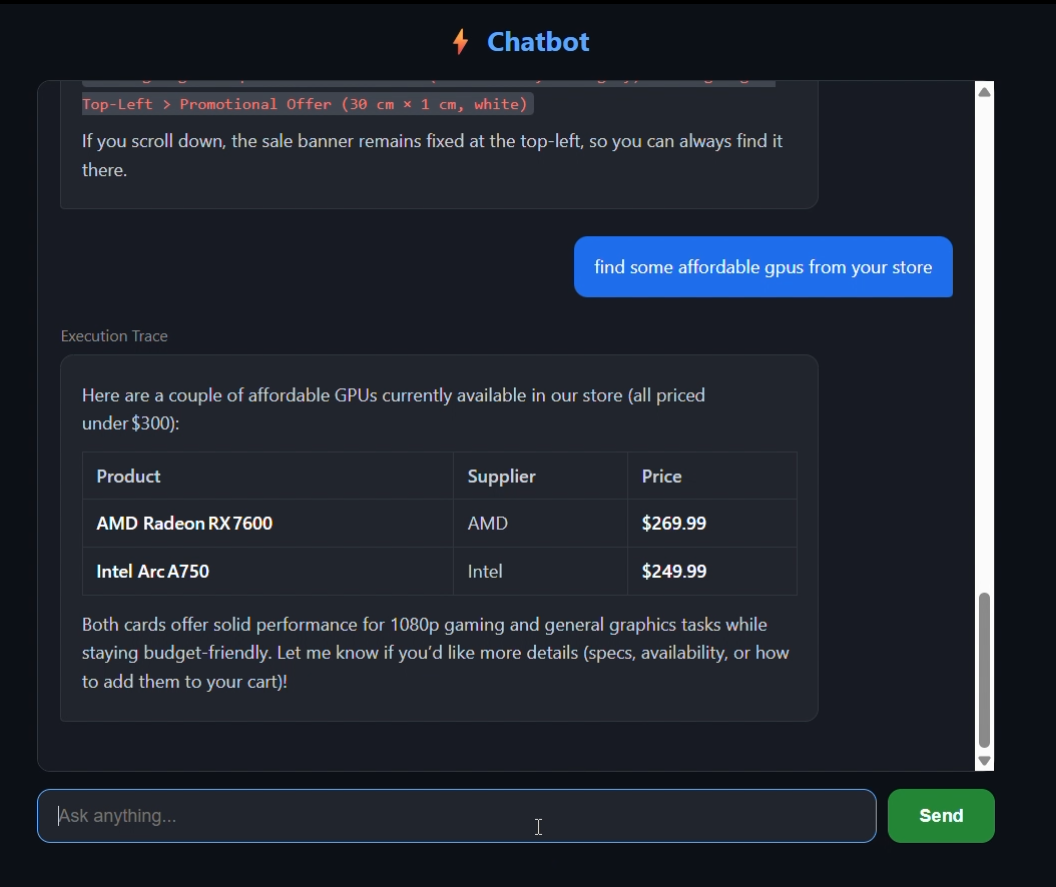
The result was a fully-fledged AI Agent through which you can find out whatever the store has to offer you, get your latest order information, know where is a particular element located, or just get latest products knowledge through internet.
I learned a lot about Agentic Systems and State Management through this project, starting with a basic chatbot, it has come a lot far, but will go further.